
Once a company reaches a certain size, housing data and building dashboards in Excel becomes pretty risky and it makes more sense for the company to transition to an agile BI solution, like Yurbi. However, we recognize that many companies use Excel to gather data, which is why we’ve always offered robust Excel/CSV integration features that allow companies to import data from Excel/CSV files and directly convert the data into a Yurbi App.
In our old model, we placed the burden on users to format and ensure data quality within the Excel or CSV file prior to importing into Yurbi. If the data wasn’t properly formatted, we would import the Excel data and then the user would be required to go into the Yurbi Architect and clean it up which could be time-consuming and require knowledge of database functions.
With our latest update to Yurbi, we’ve completely smoothed out this process. When users go in to upload the Excel or CSV file, a new window appears that allows users preview, vet, and organize the data before it is configured into a Yurbi App.
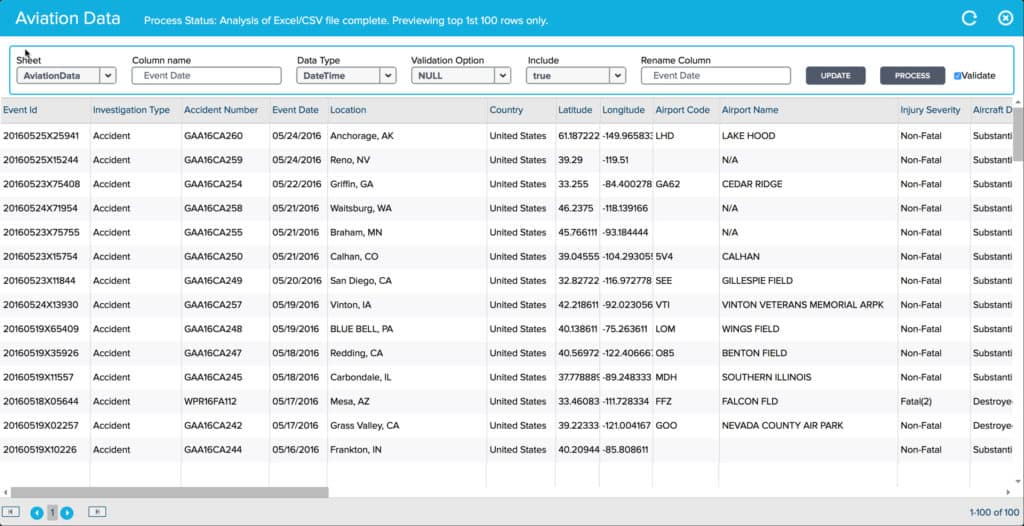 When the data is uploaded, Yurbi will guess the value types, values, column names, and other criteria that the user can then update for accuracy before it is converted. Users can also decide which columns to include if not all of the columns within the Excel document are relevant.
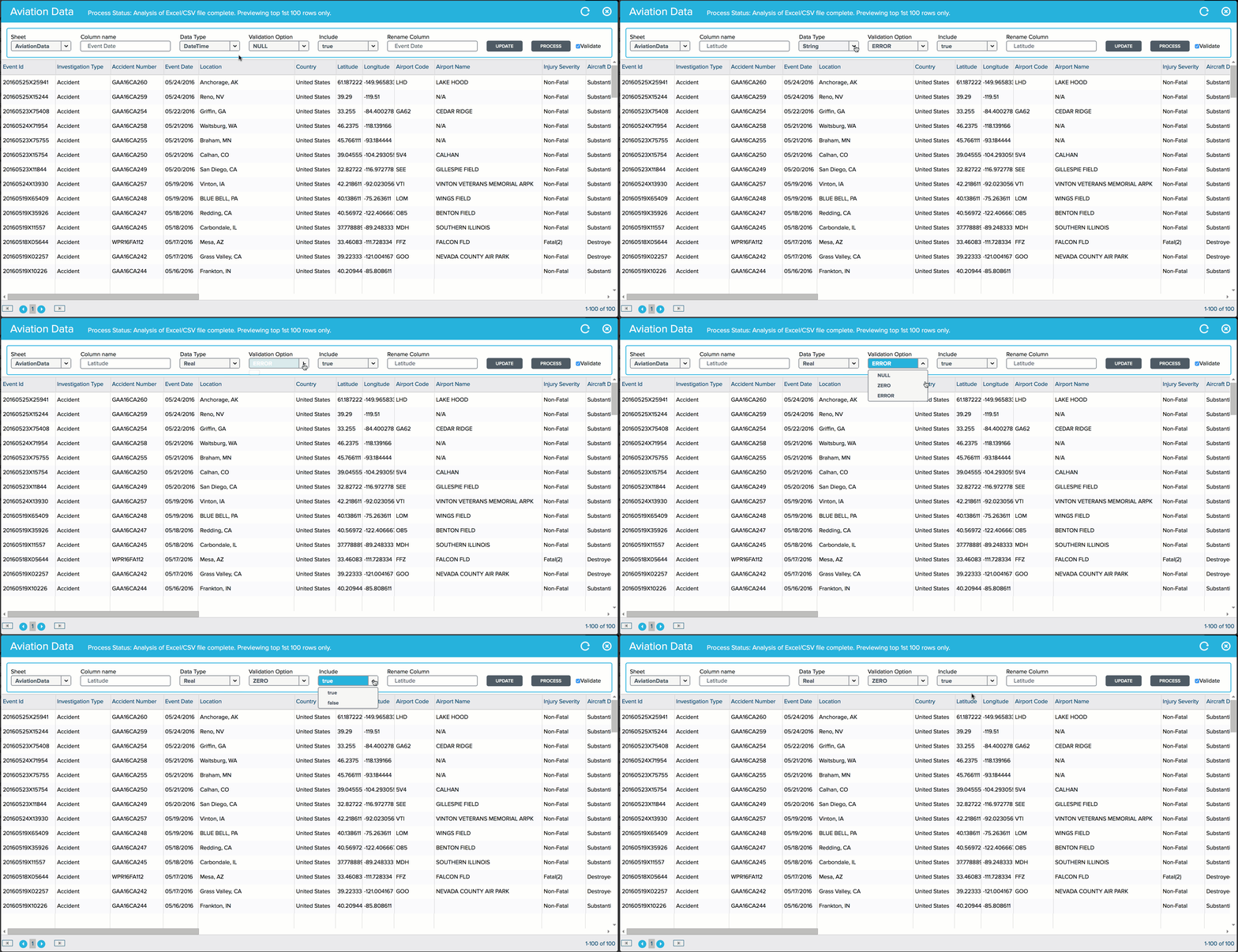 A big improvement in the Yurbi Excel/CSV import process is the ability to do data validation and set how you want data inconsistencies handled. We now provide a Validation option of Error, Null, and Zero. With Error you can test and see if there are any cells in a column that does not match the Data Type selected. So for example, if you have a Date field and there are blank values in som cells, Yurbi will give you a warning of those cells. With the Zero or Null validation option you can instruct Yurbi to set any cell value in error automatically to a zero or null value when importing the data. This allows the file to process properly and any non-numeric or non-date values to be handled properly.
An additional improvement to Yurbi's Excel and CSV processing is that it's much faster. Previously, large amounts of data could take hours to process and convert. Now, data sets of all sizes process on average 10x faster. One important factor to importing large datasets is the amount of memory on the Yurbi server. If memory is limited we recommend breaking large imports into multiple files which are imported separately. Overall, the user experience of uploading and processing Excel and CSV file data is much smoother and faster than ever before.
Are you thinking about switching from Excel to an agile BI solution? Contact us or request a demo to learn how Yurbi can help "Bring Your Data to Life!"
A big improvement in the Yurbi Excel/CSV import process is the ability to do data validation and set how you want data inconsistencies handled. We now provide a Validation option of Error, Null, and Zero. With Error you can test and see if there are any cells in a column that does not match the Data Type selected. So for example, if you have a Date field and there are blank values in som cells, Yurbi will give you a warning of those cells. With the Zero or Null validation option you can instruct Yurbi to set any cell value in error automatically to a zero or null value when importing the data. This allows the file to process properly and any non-numeric or non-date values to be handled properly.
An additional improvement to Yurbi's Excel and CSV processing is that it's much faster. Previously, large amounts of data could take hours to process and convert. Now, data sets of all sizes process on average 10x faster. One important factor to importing large datasets is the amount of memory on the Yurbi server. If memory is limited we recommend breaking large imports into multiple files which are imported separately. Overall, the user experience of uploading and processing Excel and CSV file data is much smoother and faster than ever before.
Are you thinking about switching from Excel to an agile BI solution? Contact us or request a demo to learn how Yurbi can help "Bring Your Data to Life!"
When the data is uploaded, Yurbi will guess the value types, values, column names, and other criteria that the user can then update for accuracy before it is converted. Users can also decide which columns to include if not all of the columns within the Excel document are relevant.
A big improvement in the Yurbi Excel/CSV import process is the ability to do data validation and set how you want data inconsistencies handled. We now provide a Validation option of Error, Null, and Zero. With Error you can test and see if there are any cells in a column that does not match the Data Type selected. So for example, if you have a Date field and there are blank values in som cells, Yurbi will give you a warning of those cells. With the Zero or Null validation option you can instruct Yurbi to set any cell value in error automatically to a zero or null value when importing the data. This allows the file to process properly and any non-numeric or non-date values to be handled properly.
An additional improvement to Yurbi's Excel and CSV processing is that it's much faster. Previously, large amounts of data could take hours to process and convert. Now, data sets of all sizes process on average 10x faster. One important factor to importing large datasets is the amount of memory on the Yurbi server. If memory is limited we recommend breaking large imports into multiple files which are imported separately. Overall, the user experience of uploading and processing Excel and CSV file data is much smoother and faster than ever before.
Are you thinking about switching from Excel to an agile BI solution? Contact us or request a demo to learn how Yurbi can help "Bring Your Data to Life!"
Stop rebuilding your reporting layer.
Embed Yurbi into your product and ship analytics to your customers in weeks — not quarters. Self-hosted, white-labeled, flat annual pricing.
Download Free Trial