
Everything included.
No enterprise tier required.
Multi-tenant security, white-label branding, dynamic data sources, FastCache, scheduler, and full API — all in every Yurbi plan from $10,000/year. Higher tiers add named users, not features.
- One continuously-developed code lineage since 1999 — not acquired pieces
- Weekly releases — features ship, not just bug fixes
- Self-hosted — your servers, your control, your security
Embedding & White-Label
Yurbi runs inside your product — invisible to your customers. Choose how much you expose: a single embedded dashboard, or the full self-service platform. Either way, it's your URL, your logo, your colors.
Simple Embed
- Iframe a specific report or dashboard directly into your product UI
- No Yurbi navigation, library, or builder visible to the user
- Fastest path to live — connect, configure, embed one URL
- Best for: "show customers their data" without self-service complexity
Full Platform Embed
- Expose the full platform — library, builder, dashboards, navigation
- Customers build their own reports and dashboards without your team's involvement
- Enable or hide features per tenant or user, mapped to your own pricing tiers
- Best for: ISVs making analytics a core product feature, not just a data view
iframe + API embedding
Embed any report, dashboard, or the full Yurbi interface inside your application via iframe. The DoLogin API handles SSO so your users are authenticated seamlessly — no separate login, no context switch. Header-rewrite SSO also supported.
Branding policies — per-tenant and per-user
Each tenant (your customer organization) can have its own logo, color scheme, and custom domain. Policies can also be applied at the user level within a tenant — so different users in the same organization can see different experiences. One Yurbi installation serving 100 customers — each seeing their own brand.
Feature policies — control what's exposed
Policies control which platform features are exposed per tenant or user — the report builder, library, scheduler, export, sharing, admin. Turn features on or off without code, mapped to your own product tiers.
Build your own reporting tiers
Define your own analytics tiers on top of Yurbi. Basic gets embedded dashboards. Premium gets the builder + scheduler + export. Enterprise gets everything plus custom branding. Your tiers, your pricing — Yurbi enforces the boundaries.
- iframe embedding — no JS SDK required
- DoLogin API for session-token SSO
- Header-rewrite SSO support
- Unlimited per-tenant branding policies
- Per-user policy overrides within a tenant
- Feature-level enable/disable per policy
- OEM license included in every plan
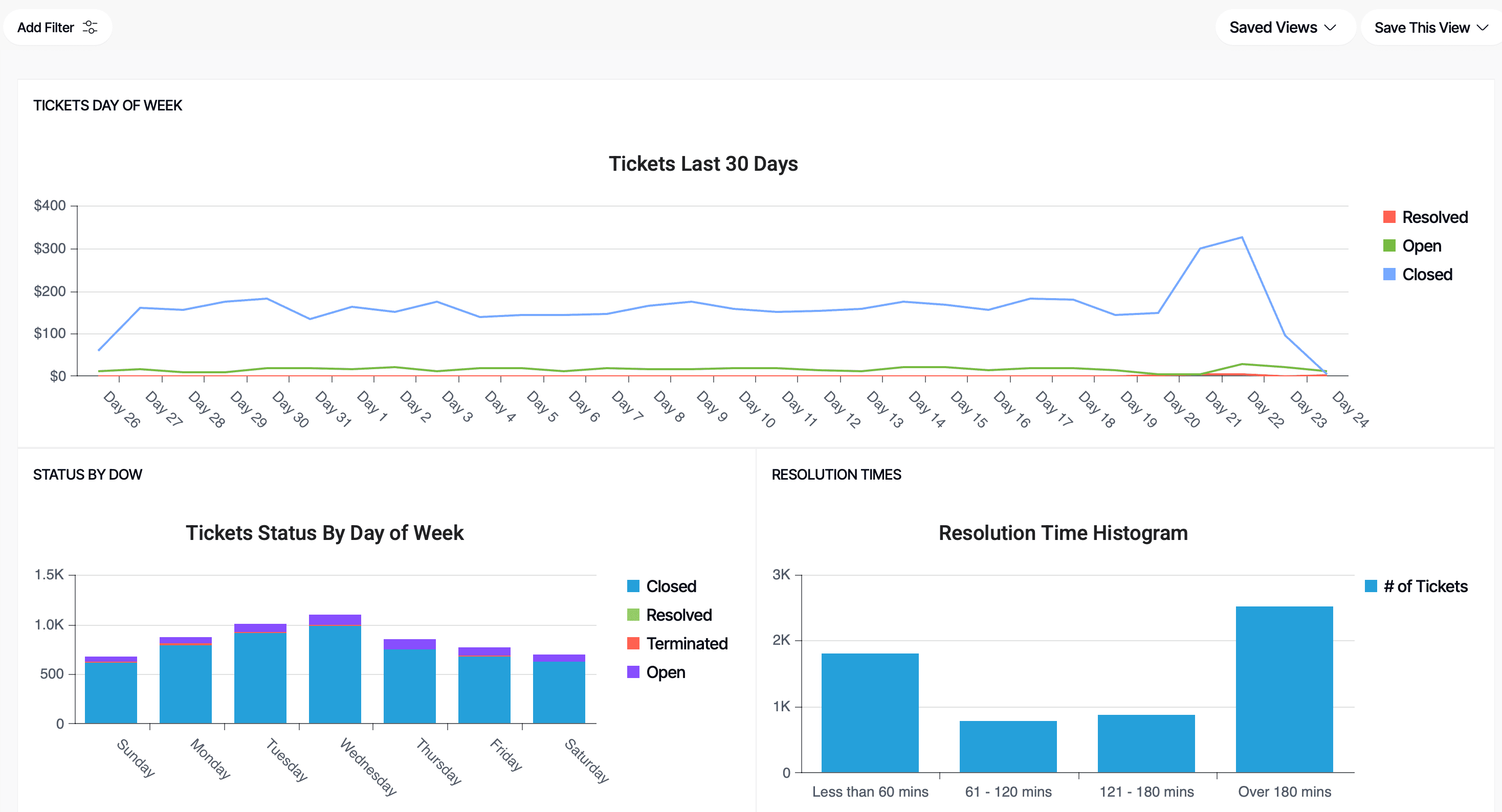
Yurbi embedded inside a SaaS product — the end user never leaves your application.
Multi-Tenant Security
Data isolation enforced at the platform layer — not in your application code. Each tenant sees only their data, no matter how the report is built or who builds it.
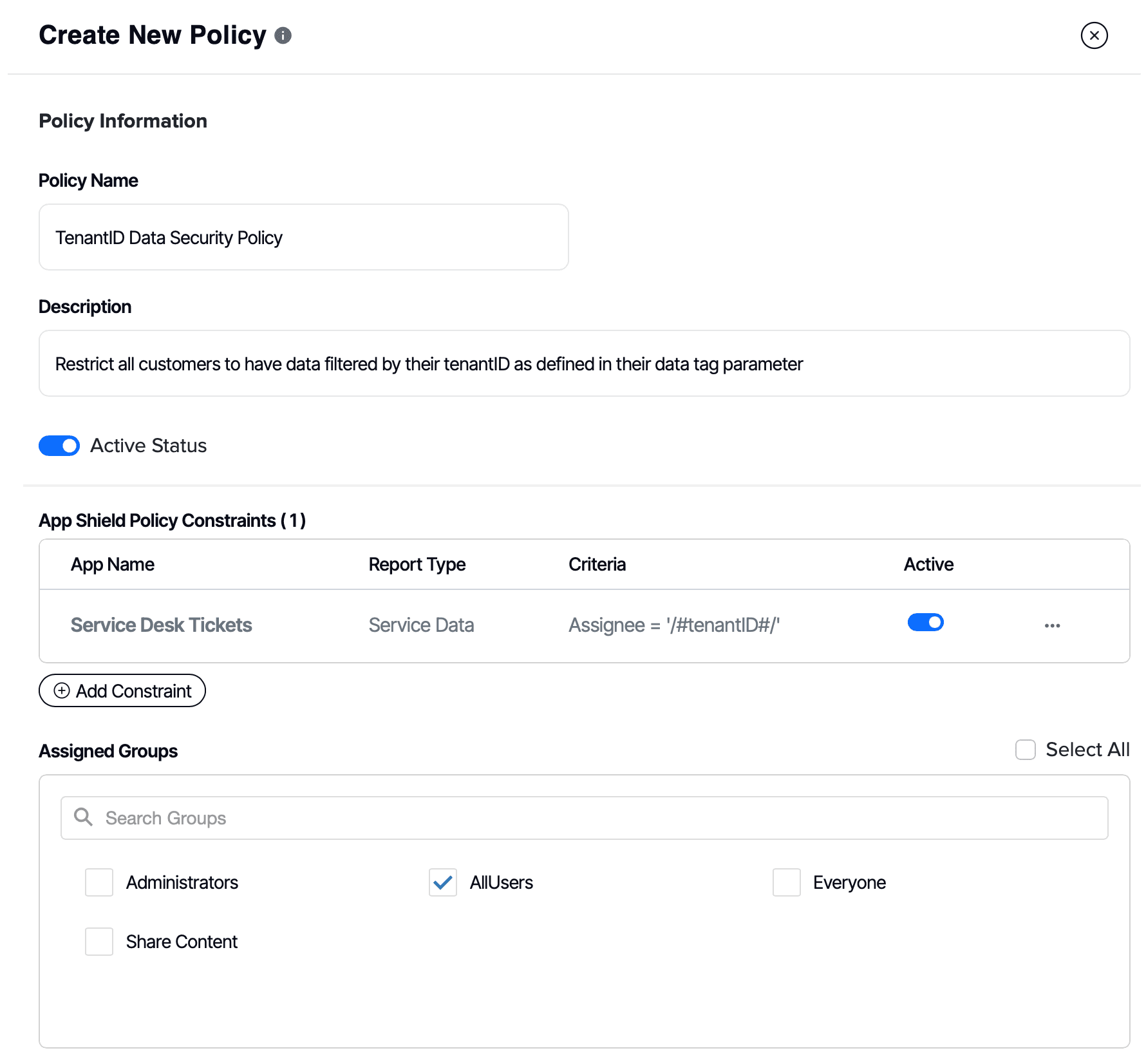
Platform-layer isolation
Tenant security is enforced inside Yurbi's query engine — not in your application code. You can't misconfigure a report and accidentally expose another tenant's data. The platform prevents it.
Role-based access control
Define roles within each tenant. Admins, report builders, view-only users. Each role sees only the reports, folders, and data fields you've permitted.
Row-level and column-level security
Restrict access to specific rows within a dataset — so a regional manager sees only their region's data. Column-level security hides sensitive fields entirely from certain roles.
Semantic layer enforcement
The semantic layer maps database fields to user-friendly terms — and enforces security at that layer. Users can only build reports on fields they have permission to see, regardless of what SQL is underneath.
- Tenant isolation at query engine level
- Role-based access control per tenant
- Row-level data filtering
- Column-level field hiding
- Folder-level permissions
- Encrypted passwords, credentials never in plaintext
Dynamic Data Sources
Each tenant can have their own database — on their own server, in their own cloud account, or in your shared infrastructure. Yurbi routes queries to the right database at runtime, automatically.
Per-tenant database routing
Define a connection string per tenant. When a user from Acme Corp runs a report, Yurbi connects to Acme's database. When GlobalCo runs the same report, it connects to theirs. One report template, infinite tenants.
Multi-tenant and single-tenant architectures
Whether your product uses a shared database with a tenant column, a separate schema per customer, or entirely separate database servers — Yurbi handles all three patterns.
One server or many — your choice
Run a single Yurbi server connected to multiple tenant databases (must be network-reachable from that server), or deploy separate Yurbi servers — one per customer, region, or dedicated deployment. Mix architectures freely. See per-server pricing →
MS SQL, PostgreSQL, ODBC, and more
Native support for Microsoft SQL Server and PostgreSQL. ODBC connectivity expands that to MySQL, Oracle, and others. MS SQL backend gives Yurbi higher concurrent user capacity via connection pooling.
- Per-tenant DB connection at runtime
- Shared DB, schema-per-tenant, or DB-per-tenant
- MS SQL Server — native + high concurrency
- PostgreSQL — fully supported
- ODBC for MySQL, Oracle, and more
- Single server or multiple — deploy per architecture
- Additional production deployments: $500/year list rate — volume discounts after 10
- Excel / CSV upload support
Dashboards & Reports
This is what your customers see every day — the deliverable. Multi-report dashboards, drill-down reports, KPI tiles, scheduled delivery, and self-service filtering. All embedded under your brand.
Multi-report dashboards
Combine multiple reports — charts, KPI tiles, data grids — onto a single dashboard view. Parameter-driven so filters apply across all panels simultaneously.
Drill-down & drill-through
Click a summary value to drill into detail. Pass parameters from one report to another. Users explore their data without needing to know SQL or build anything themselves.
KPI tiles & scorecards
Single-value metrics with trend indicators, comparison values, and color thresholds. Build executive summary views your customers can understand at a glance.
Scheduling & automated delivery
Schedule any report to run automatically and deliver via email — PDF, Excel, or image attachment. Per-user delivery so each recipient gets their own filtered data. See full scheduler details →
Export to PDF, Excel & CSV
Any report or dashboard can be exported on demand. Users download exactly what they see — filtered, tenant-scoped, formatted.
Global & personal filters
Filters can be global (applied to all reports on a dashboard) or personal (saved by each user). Users can save their own filtered views without modifying the base report.
Direct link sharing
Share a filtered report view via a direct link. Recipients see the same filtered state — useful for sharing specific data slices in support tickets or customer conversations.
Pivot tables & data grids
Interactive pivots, grouped tables, aggregate grids, and hierarchical reports. Users can sort, expand, and collapse — all client-side, no page reload.
Display / TV mode
Full-screen kiosk mode for dashboards displayed on monitors or operations screens. Rotates through report views automatically on a configurable interval.
Scheduler & Automated Delivery
Automate report and dashboard delivery to your customers on any schedule. Configure once — Yurbi handles the delivery, the per-user security, and the output format.
Flexible schedule frequencies
Schedule any report or dashboard to run on a recurring basis: every N minutes, daily, weekly, monthly, quarterly, or yearly. Each schedule is defined at the report or dashboard level — you can mix cadences across your content library freely.
Individual and bulk scheduling
Schedule individual reports to deliver independently — or use bulk scheduling to send a dashboard screenshot plus PDF/Excel exports of each panel in one packaged delivery. Useful for executive summaries that need both the visual and the raw data.
Recipient modes — internal users or bulk email
In the default mode, the recipient list is limited to Yurbi tenant users. Each user receives a delivery using their own security context — so a user who has access to only their region's data receives a report filtered to their region automatically. Bulk email mode (a global server setting) allows free-form email entry for recipients outside your user list; deliveries in bulk mode use the schedule creator's security context.
No results, no email
If a scheduled report returns no rows, no email is sent. This makes minute-interval scheduling a useful alert mechanism — configure a report that only returns results when a threshold is crossed, schedule it every few minutes, and recipients are notified when the condition is met. Note: as long as the condition persists, the alert fires on every poll cycle.
Parallel scheduler processes
One scheduler process runs by default. For high-volume deployments, run multiple in parallel — sized to your server's CPU and memory.
- Minutes, daily, weekly, monthly, quarterly, yearly
- Individual report or bulk dashboard + reports delivery
- PDF, Excel, and dashboard screenshot attachments
- Per-user security maintained in every delivery
- No results = no email (threshold alerting pattern)
- Configurable parallel scheduler processes
- SMTP gateway configured server-wide (shared across tenants)
No-Code Report Builder & Direct SQL
Non-technical users build their own reports without IT involvement. Power users go straight to SQL. Both paths produce the same secure, embeddable output.
Drag-and-drop report builder
Select fields from the semantic layer, drag them into rows and columns, pick a visualization type, apply filters. No SQL, no code, no IT ticket. Your customers' non-technical users are self-sufficient from day one.
Semantic layer
You map raw database fields to user-friendly labels once — "acct_rev_ytd" becomes "Revenue YTD." The semantic layer also enforces security, so users can only build reports on fields they have permission to see. Even raw SQL access respects tenant boundaries.
Direct SQL & stored procedures
Power users who know their data model can write SQL directly. Stored procedures are fully supported. Complex joins, window functions, CTEs — if your database handles it, Yurbi can run it and render it.
Data transformation
Calculated fields, aggregations, conditional logic, and data blending — built in the report layer without modifying your source database or maintaining a separate ETL pipeline.
- Drag-and-drop for non-technical users
- Semantic layer with security enforcement
- Direct SQL for power users
- Stored procedure support
- Calculated fields and data blending
- No ETL required — connects live to your DB
No-code report builder — your customers build their own reports without IT involvement.
Visualizations
20+ chart types built on an HTML/JS/CSS visualization layer. Because the layer is open, custom chart types can be added faster than any enterprise vendor with an annual release cycle.
FastCache
In-memory dashboard caching purpose-built for multi-tenant embedded analytics. Reports pre-render in the background — your customers click and see data instantly, even at scale.
Pre-rendered in memory
FastCache runs reports in the background on a schedule you define. When a user opens a dashboard, the result is already in memory. No waiting for a live database query — sub-second load times regardless of data complexity.
Per-report cache control
Set cache refresh intervals per report. A real-time operational dashboard can refresh every 5 minutes. A monthly summary report can cache overnight. You control the trade-off between freshness and performance.
Scales with your user count
As your tenant count and concurrent user count grow, FastCache ensures database load doesn't grow linearly with it. One cache refresh serves unlimited concurrent users viewing the same report — no matter how many tenants you're serving.
- Sub-second load times for complex reports
- Configurable refresh interval per report
- Per-tenant cache scoping
- Database load decoupled from user count
- Included in all plans
Content Sync
Build your report library and App configuration once — then push it to connected server deployments. Manage your analytics content centrally and distribute it to customers without manual re-configuration on every server.
Connected Server Sync
- Push Apps (semantic layer configuration) and report/dashboard content between connected online servers
- Maintain a central source-of-truth server — sync updates to all customer deployments when you update your canned reports
- Control which content is available to which connected servers and their tenants
- Enables premium content tiers — push a set of reports only to servers that have purchased a premium analytics package
- Sync new Apps and content updates without touching each server individually
Export / Import (Offline & On-Prem)
- For air-gapped or offline servers that cannot reach your central server, content is moved via export and import packages
- Export an App or a set of reports from your source server, then import the package on the target server
- Use this at initial deployment to pre-load a new on-prem customer installation with your standard report library
- Also used for subsequent updates — export the updated content, import it manually on the target server
- This is a one-time transfer mechanism, not ongoing sync — each update requires a new export/import cycle
API & Automations
Full REST API for programmatic control. Provision tenants, manage users, trigger report generation, push data — integrate Yurbi into your product's backend like any other service.
Tenant & user provisioning
When a new customer signs up for your product, your backend calls the Yurbi API to create their tenant, configure their data source, and set up their initial users — all automated, no manual admin work.
SSO via DoLogin API
Authenticate users from your product into Yurbi without a separate login. Pass user identity and tenant context via the DoLogin API — your user clicks a link in your app and lands inside their Yurbi analytics already authenticated.
Data retrieval via API
Pull report data programmatically as JSON via the REST API. Use this to surface Yurbi data inside your own application views, push it into other systems, or build custom notification logic on top of Yurbi's query engine. PDF and Excel exports are available through the Yurbi interface — scheduled delivery and on-demand download — and through export endpoints in the API.
Full programmatic control
The full Yurbi API covers everything available in the admin interface — managing reports, folders, users, roles, data sources, and branding. Whatever you configure manually, you can automate via API.
- Full REST API — all admin operations available
- DoLogin API for SSO integration
- Automated tenant provisioning
- User & role management via API
- Report data retrieval as JSON
- PDF & Excel export — scheduled or on-demand
{
  "sessionToken": "…",
  "withpin": true,
  "user": {
    "ID": null,
    "LoginName": "jsmith",
    "FirstName": "Jane",
    "LastName": "Smith",
    "EmailAddress": "jsmith@acmecorp.com",
    "Tag1": "ACMECORP",
    "UserApplications": [
      { "ApplicationID": "1001",
        "ApplicationRoleName": "Agent" }
    ]
  }
}Self-Hosted Platform
Yurbi runs on your servers. Your data never touches our infrastructure. You control deployment, upgrades, and scaling — no surprise changes, no vendor cloud dependency.
Windows
- Windows Server 2016+ or Windows 10/11 (x64)
- 8 GB RAM minimum
- Modern CPU 3 GHz+ recommended
- x86/amd64 — ARM not supported
Linux
- Ubuntu, Debian, RHEL/CentOS or compatible
- 8 GB RAM minimum
- Modern CPU 3 GHz+ recommended
- x86/amd64 — ARM not supported
Docker
- Docker Engine 20.10+
- x86/amd64 only — ARM not supported
- 8 GB RAM minimum
- Modern CPU 3 GHz+ recommended
Backend Database
- Microsoft SQL Server — recommended for high concurrency
- PostgreSQL — fully supported
- 1 Development + 1 Production license included
- Additional deployments: $500/year list rate — volume discounts after 10 deployments. Contact us for large deployments.